


The Auto-Crop Editor automatically detects faces across a folder of portrait photos and applies consistent crops based on a preset. You can review...
Read moreRetouching 2.0 throughput & performance stats
Retouching 2.0 was rebuilt from scratch to deliver more robust detection, more natural results, and higher image quality. This added quality comes with a measurable cost to throughput. The figures below show the reduction in throughput when all eight tools of Retouching 2.0 is applied, compared to current retouching, across each platform.
Throughput impact vs current retouching
| Implementation | Throughput decrease |
| CLI | 17% |
| QuickServer (Windows) | 29% |
| QuickServer (Mac ARM) | 32% |
| Web API | 10% |
Where the time goes
The chart below shows the share of total processing time across the eight Retouching 2.0 tools. While actual percentages vary from machine to machine, in general, Shine Removal takes up about half of the total processing time, and Blemish Removal takes up about a third of the remaining time.
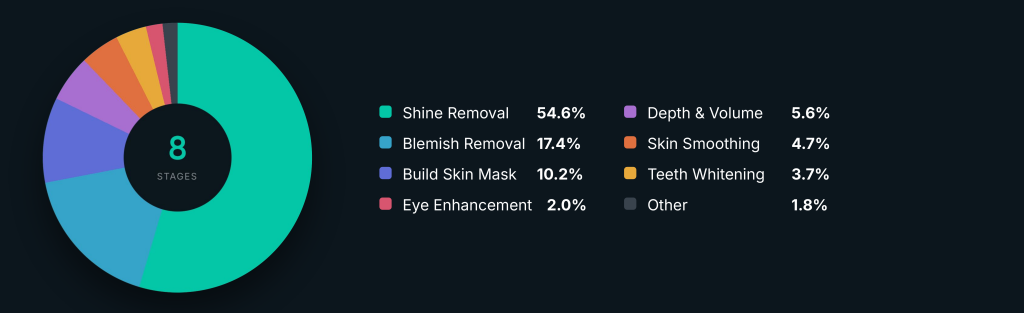
| Stage | Share of processing time |
| Shine Removal | 54.6% |
| Blemish Removal | 17.4% |
| Build Skin Mask | 10.2% |
| Depth & Volume | 5.6% |
| Skin Smoothing | 4.7% |
| Teeth Whitening | 3.7% |
| Eye Enhancement | 2.0% |
| Other | 1.8% |