No – don’t process, down res or do anything to your images before running them through our service. It’s best to run the...
Read moreHow do I import a single preset?
If you’re using Workbench version 5.0.0 or later, please refer to this guide. The information below applies to version 4.9.9 and earlier.
How do I check my version number?
You can find the version number in the bottom right-hand corner of the Workbench application window.
How do I update to the latest version?
1. Launch Workbench.
2. Click the version number in the bottom right-hand corner.
3. Click the Update button.
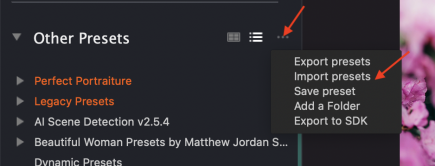
In Workbench, you have the option to import a single preset or an entire Preset Group. If you are importing a single preset, click on the three dots in the “Other Presets” section of Workbench. Then, choose “Import presets.” Then you can navigate through the folder tree to select the preset to import.